
How Provisioner™ Works
A step-by-step view of how devices are securely onboarded, matched to recipes and provisioned at scale using BootBOX and Accelerator.

Local Execution — BootBOX™
Every device boots securely through a ProvisionerBootBOX™ appliance. BootBOX™ validates identity, creates a trusted environment and initiates provisioning without the risks of shared USB keys or PXE servers.

Cloud Orchestration — Management Portal™
The Management Portal™ determines exactly how each device should be built.
Key actions:
- Assigns the correct ProvisionerRecipe™
- Handles policy enforcement
- Generates and injects credentials dynamically
- Tracks build status in real time
- Logs every action for compliance

Accelerator
Accelerator™ delivers OS and app packages at high speed using local caching.
Benefits:
- High performance, even on remote or bandwidth-limited sites
- Parallel provisioning at scale
- Reduced load on cloud and WAN
- Consistent delivery across distributed environments
Provisioning Flow with Accelerator
ProvisionerClaimMe™
- The customer logs into the Provisioner.com Admin Portal and adds the BootBOX to their account using a simple 6-digit code.
- The BootBOX connects and sits in an “Unclaimed” waiting room only visible by Provisioner.com Admins.
- After the 6-digit code is entered, the BootBOX is claimed & resides in the customer’s inventory.
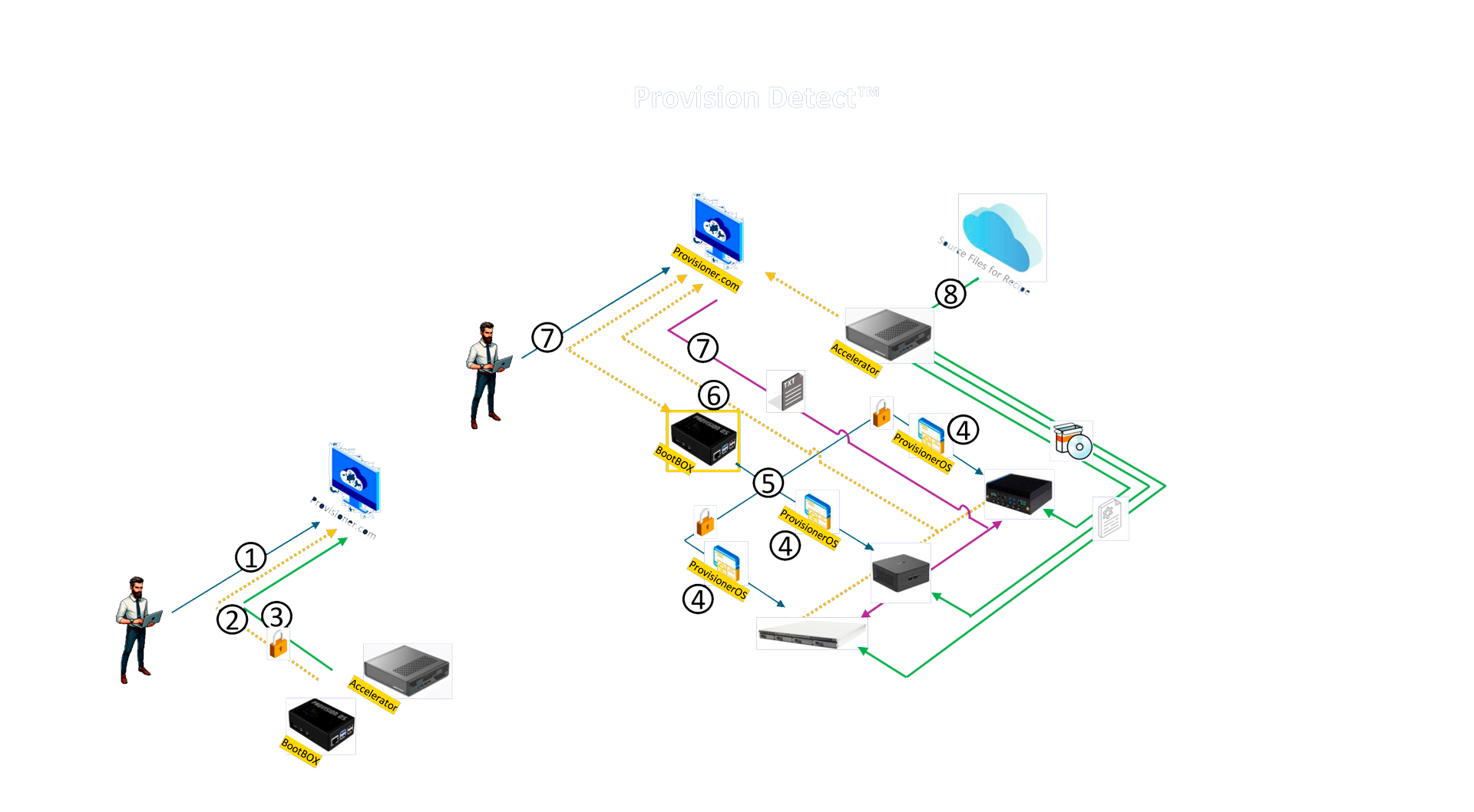
4. The target devices finds the BootBOX Server and loads ProvisionerOS.
5. ProvisionerOS™ collects info about the target device, gets login details from the BootBOX and connects to the Provisioner.com Server.
6. If the details are correct, the target device joins the customer’s waiting area on the Provisioner.com Portal.
7. If auto-recipe selection is on, the Provisioner.com Portal matches the device to a pre-set recipe based on its H/W characteristics and assigns it automatically. Or, the device stays in the waiting area until an admin assigns a recipe.
8. ProvisionerOS starts executing the recipe on the target device and reports progress to the Provisioner.com Portal.
Provision 10, 100 or 1000+ Devices Simultaneously
Provisioning Flow with Accelerator
ProvisionerClaimMe™
- 1. The customer logs into the Provisioner.com Admin Portal and adds the BootBOX to their account using a simple 6-digit code.
- 2. connects and sits in an “Unclaimed” waiting room only visible by Provisioner.com Admins.
- 3. After the 6-digit code is entered, the BootBOX is claimed & resides in the customer’s inventory.
- 4. The target device finds the BootBOX Server and loads ProvisionerOS.
- 5. ProvisionerOS™ collects info about the target device, gets login details from the BootBOX and connects to the Provisioner.com Server.
- 6. If the details are correct, the target device joins the customer’s waiting area on the Provisioner.com Portal.
- 7. If auto-recipe selection is on, the Provisioner.com Portal matches the device to a pre-set recipe based on its H/W characteristics and assigns it automatically.
- 8. ProvisionerOS starts executing the recipe on the target device and reports progress to the Provisioner.com Portal.
Provision 10, 100 or 1000+ Devices Simultaneously

Want to Learn More?
Get in touch to see how Provisioner™ can transform your device deployment workflow.